
Personalwesen in boring.tax: Mitarbeiter, Lohndaten und Onboarding – alles an einem Ort
Kategorie: Produkt-Update · Lesezeit: ca. 7 Min.
Warum HR für kleine Unternehmen so mühsam ist
Ein neuer Mitarbeiter fängt an. Du brauchst seine Stammdaten, die Steuerklasse, die Sozialversicherungsnummer, die Krankenkasse, die IBAN. Also schickst du ein PDF-Formular per E-Mail. Es kommt halb ausgefüllt zurück. Du fragst nach. Dann liegt es in deinem Postfach, irgendwo zwischen Lohnabrechnungen und Belegen — und dein Steuerberater bekommt am Ende eine andere Version als die, die du eigentlich freigegeben hattest.
Diese PDF-, Excel- und E-Mail-Jonglage ist fehleranfällig, zeitraubend und für niemanden angenehm — weder für dich noch für deine Mitarbeiter.
Deshalb haben wir Personalwesen gebaut: ein vollständiges HR- und Lohn-Onboarding, direkt integriert in boring.tax. Hier ist, was es kann und wie du es nutzt.
Was neu ist: Ein Überblick
- Zentrale Mitarbeiterübersicht: alle Beschäftigungsverhältnisse auf einen Blick
- Strukturierte Stammdaten- und Jobdaten-Formulare statt PDF-Chaos
- KI-Assistent, der Formulare per natürlicher Sprache ausfüllt und Fragen beantwortet
- Mitarbeiter-Portal zur Selbsterfassung — inkl. sicherem Datenraum für Lohnabrechnungen
- Lückenlose Freigabe-Workflows mit Diff-Ansicht und vollständigem Audit-Log
- Monatlicher Abrechnungszyklus — in enger Abstimmung mit deinem Steuerberater
Alle Features sind sofort einsatzbereit in deinem boring.tax-Account. Kein Setup erforderlich.
1. Die Mitarbeiterübersicht
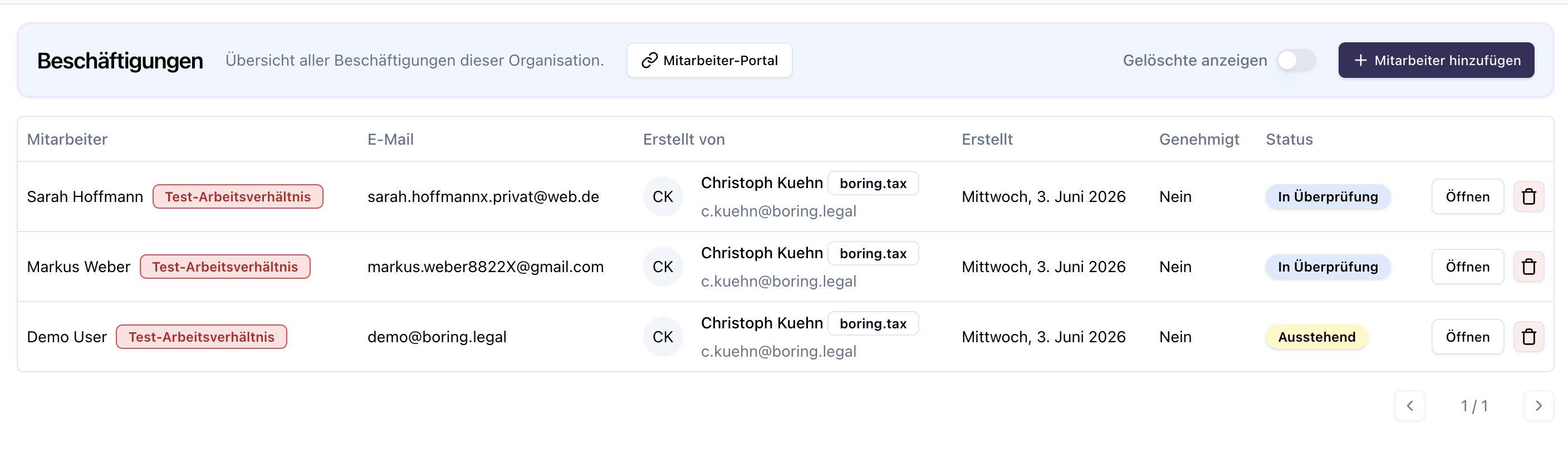
Personalwesen findest du in der linken Navigation in der boring.tax-Plattform. Kein separates Tool, kein zweiter Login. Die Mitarbeiterübersicht zeigt alle aktiven Arbeitsverhältnisse mit Name, E-Mail, Ersteller, Status und Freigabestand.
Jeder Mitarbeiter ist über seine E-Mail eindeutig identifiziert und taucht auch in deinen Kontakten auf. Personalwesen sitzt also auf derselben Datenbasis wie der Rest von boring.tax. Beim Status siehst du auf einen Blick, wo du als Arbeitgeber reagieren musst: „In Überprüfung” heißt, es liegen Daten zur Freigabe vor; „Ausstehend” heißt, der Mitarbeiter hat noch nicht alles eingepflegt.
2. Stammdaten & Jobdaten strukturiert statt als PDF
Für jede Beschäftigung werden zwei Kernformulare automatisch angelegt. Die Stammdaten enthalten alle persönlichen Angaben — Name, Geburtsdatum, Adresse, IBAN, Steuerklasse, Sozialversicherungsnummer, Krankenversicherung — und werden vom Mitarbeiter selbst ausgefüllt, vom Arbeitgeber geprüft und freigegeben. Die Jobdaten enthalten die arbeitgeberseitigen Informationen wie Rolle, Konditionen und Vergütung und sind für den Mitarbeiter nur einsehbar. Transparenz für den Mitarbeiter, Kontrolle beim Arbeitgeber.
Beide Formulare sind Pflicht: Erst wenn Stammdaten und Jobdaten ausgefüllt und freigegeben sind, wird das Startdatum ausgelesen und das Arbeitsverhältnis aktiv. Und sie bleiben über alle Abrechnungszyklen hinweg gültig, während Formulare wie Abwesenheiten mit jedem neuen Monat zurückgesetzt werden.
3. Der KI-Formular-Assistent als komfortables Highlight
Niemand füllt gerne Formulare aus. Deshalb hat jedes Formular in Personalwesen einen integrierten KI-Assistenten. Statt sich durch Felder zu klicken, beschreibst du einfach in natürlicher Sprache, was du willst — zum Beispiel beim Abwesenheitsformular: „krank vom 1. Juni bis 20. Juli”. Der Assistent füllt die passenden Felder automatisch aus.
Und er beantwortet Fragen: „Was muss ich hier eintragen?” Das reduziert genau die ständigen Rückfragen, die sonst per E-Mail oder Anruf bei dir landen. Der Assistent steht allen zur Verfügung, die Formulare ausfüllen — Mitarbeitern wie Arbeitgebern.
4. Mitarbeiter-Portal & gezielte Delegation
Über das Mitarbeiter-Portal pflegen deine Mitarbeiter ihre Daten selbst ein. Du gibst den Portal-Link weiter, der Mitarbeiter meldet sich mit seiner hinterlegten E-Mail an und bekommt einen sicheren Login-Link. Im Portal sieht er alle für ihn erstellten Formulare und kann selbst neue anlegen — etwa einen Urlaubsantrag, natürlich ebenfalls mit dem KI-Assistenten.
Du musst Portal-Zugriff aber nicht zwingend gewähren. Auch ohne Portal kannst du ein einzelnes Formular gezielt anfordern: Über „Ausfüllen an Mitarbeiter delegieren” verschickst du einen Einmal-Link, der nur für genau dieses eine Formular gilt — und für nichts anderes.
5. Dateien, Datenraum & Lohnabrechnungen
Sobald du ein Arbeitsverhältnis anlegst, wird automatisch ein mitarbeiterspezifischer Ordner erstellt, der mit dem Mitarbeiter geteilt ist. Lohnabrechnungen legst du einfach dort ab, statt sie per E-Mail zu verschicken — der Mitarbeiter lädt sie sich selbst herunter.
Dahinter steht ein granulares Freigabe-Modell: Du kannst jeden Ordner gezielt teilen, ohne dass jemand Einblick in deine übrige Buchhaltung bekommt — im Grunde ein integrierter, sicherer Datenraum. Lädt ein Mitarbeiter selbst eine Datei hoch, landet sie zunächst in einem Freigabe-pending-Status und wird nicht ungeprüft verarbeitet. So wird etwa kein versehentlich hochgeladener Beleg automatisch verbucht.
6. Freigabe-Workflow mit Diff-Ansicht
Nehmen wir eine Gehaltserhöhung als Beispiel: Du bearbeitest das Jobdaten-Formular, trägst die neue Vergütung ein und setzt einen Stichtag. Sobald du speicherst, wechselt das Formular in den Review-State. In der Freigabe siehst du eine echte Diff-Ansicht — alter Wert, neuer Wert, genau was sich geändert hat.
Dabei greifen klare Rollen: Ändert ein Mitarbeiter etwas im Portal, geht es an den Arbeitgeber zur Freigabe. Eine spezielle HR-Master-Rolle kann Änderungen direkt umsetzen. Der Änderungen-Tab führt ein vollständiges Audit-Log: welches Formular, welcher Zyklus, von wem geändert und freigegeben — jeweils mit Diff. Zentral gebündelt findest du alle offenen Änderungen unter „Formularänderungen” — deiner To-do-Liste als Arbeitgeber. Kein E-Mail-Ping-Pong, kein Datenverlust.
7. Weitere Formulare für den laufenden Betrieb
Neben Stamm- und Jobdaten stehen weitere Formulare für den Alltag bereit — alle folgen demselben Workflow: erstellen, einreichen, freigeben, fertig.
- Abwesenheiten: Urlaub, Krankheit und sonstige Abwesenheiten strukturiert erfassen — statt Einträge in Tabellen oder E-Mails zu verwalten.
- Benefits: Änderungen an Sachbezügen oder Zusatzleistungen dokumentieren.
- Einmalzahlungen: Boni oder Sonderzahlungen direkt im Abrechnungszyklus anlegen.
- Erstattungen: Auslagen und payroll-relevante Korrekturen — mit Mehrfacherfassung in einem Durchgang.
- Zeitereignisse: Überstunden und Zuschläge festhalten.
- Dienstreisen: Reisedaten und erstattungsfähige Ausgaben erfassen.
- Kündigung: Arbeitsverhältnisse strukturiert und nachvollziehbar beenden.
Jede Änderung landet im Freigabe-Workflow und ist im Audit-Log vollständig dokumentiert.
8. Der monatliche Abrechnungszyklus
Personalwesen rechnet pro Monat ab. Bei Formularen wie Erstattungen kannst du mehrere Einträge auf einmal erfassen.
Am Monatsende schließt du den Abrechnungszyklus: Die Lohnabrechnung wird von boring.tax hochgeladen — und erst wenn alle Formulare freigegeben sind, lässt sich der Zyklus abschließen. Danach wechselt das System automatisch in den Folgemonat, die persistenten Formulare bleiben erhalten.
Jetzt ausprobieren
Lege dein erstes Arbeitsverhältnis an — oder teste den kompletten Workflow gefahrlos mit einem Test-Arbeitsverhältnis, das keine Payroll-Aufgaben erstellt und keine Abrechnung auslöst.
Noch kein boring.tax-Nutzer? Jetzt kostenlos testen →
HR & Payroll in boring.tax: Employees, Tax Data, and Onboarding — Finally in One Place
Category: Product Update · Read time: ~7 min
Why HR is so painful for small businesses
A new employee starts. You need their personal data, tax class, social security number, health insurance, IBAN. So you email a PDF form. It comes back half-filled. You follow up. Then it sits in your inbox somewhere between payslips and receipts — and your tax advisor ends up with a different version than the one you actually approved.
This juggling of PDFs, spreadsheets, and email is error-prone, time-consuming, and pleasant for no one — neither for you nor for your employees.
That’s why we built Personalwesen: complete HR and payroll onboarding, integrated directly into boring.tax. Here’s what it can do and how to use it.
What’s new: An overview
- Central employee dashboard: all employment relationships at a glance
- Structured master-data and job-data forms instead of PDF chaos
- AI assistant that fills forms via natural language and answers questions
- Employee self-service portal — including a secure data room for payslips
- Complete approval workflows with diff view and full audit log
- Monthly billing cycle — in close coordination with your tax advisor
All features are ready to use immediately in your boring.tax account. No setup required.
1. The employee dashboard
Personalwesen lives in the left navigation of the boring.tax platform. No separate tool, no second login. The dashboard shows all active employment relationships with name, email, creator, status, and approval state.
Each employee is uniquely identified by their email and also appears in your contacts — so HR sits on the same data foundation as the rest of boring.tax. The status column shows at a glance where you need to act as an employer: “In Review” means data is pending your approval; “Pending” means the employee hasn’t filled everything in yet.
2. Master data & job data — structured, not PDF
Two core forms are created automatically for each employment. Master data holds all personal details — name, date of birth, address, IBAN, tax class, social security number, health insurance — filled in by the employee, reviewed and approved by the employer. Job data holds employer-side information like role, terms, and compensation, and is view-only for the employee. Transparency for the employee, control for the employer.
Both forms are mandatory: only once they’re filled and approved does the start date get read and the employment become active. They persist across all billing cycles, while forms like absences reset each month.
3. The AI form assistant — the standout feature for comfort
Nobody enjoys filling out forms. So every form in Personalwesen has a built-in AI assistant. Instead of clicking through fields, you simply describe what you want in natural language — for an absence form, for example: “sick from June 1 to July 20.” The assistant fills the right fields automatically.
It also answers questions: “What do I enter here?” This cuts down exactly the constant back-and-forth that otherwise lands in your inbox as emails or calls. The assistant is available to everyone filling forms — employees and employers alike.
4. Employee portal & targeted delegation
Through the employee portal, your team maintains their own data. You share the portal link, the employee logs in with their registered email, and receives a secure login link. In the portal they see all forms created for them and can create new ones — like a vacation request, again with the AI assistant.
You don’t have to grant portal access, though. Even without it, you can request a single specific form: via “Delegate to employee” you send a one-time link valid only for that one form — and nothing else.
5. Files, data room & payslips
When you create an employment, an employee-specific folder is created automatically and shared with that employee. You drop payslips there instead of emailing them — the employee downloads them themselves.
Behind this is a granular sharing model: you can share any folder selectively without anyone getting a view into the rest of your accounting — essentially a built-in secure data room. When an employee uploads a file themselves, it lands in a pending-approval state and isn’t processed unreviewed. That way, no accidentally uploaded document gets automatically booked.
6. Approval workflow with diff view
Take a salary increase as an example: you edit the job-data form, enter the new compensation, and set an effective date. On save, the form enters review state. In the approval view you see a real diff — old value, new value, exactly what changed.
Clear roles apply: when an employee makes changes via the portal, they go to the employer for approval. A special HR-Master role can apply changes directly. The changes tab keeps a full audit log: which form, which cycle, changed and approved by whom — each with a diff. All open changes are bundled centrally under “Form changes” — your to-do list as an employer. No email ping-pong, no data loss.
7. Additional forms for day-to-day operations
Beyond master and job data, a full set of forms covers everything that happens during normal operations — all following the same workflow: create, submit, approve, done.
- Absences: Record vacation, sick leave, and other absences in a structured way — no more spreadsheet entries or chasing emails.
- Benefits: Document changes to perks or additional compensation.
- One-off payments: Add bonuses or special payments directly within the billing cycle.
- Reimbursements: Capture expense claims and payroll adjustments — with multi-entry support in a single pass.
- Time events: Log overtime and allowances.
- Business trips: Record travel data and reimbursable expenses.
- Termination: End employment relationships in a structured, traceable way.
Every change goes through the approval workflow and is fully documented in the audit log.
8. The monthly billing cycle
Personalwesen bills monthly. For forms like reimbursements you can add multiple entries at once.
At month-end you close the billing cycle: the payslip is uploaded in boring.tax — and only once all forms are approved can the cycle be closed. The system then moves automatically to the next month; persistent forms are retained.
Try it now
Create your first employment — or test the entire workflow risk-free with a test employment that creates no payroll tasks and triggers no billing.
Not yet a boring.tax user? Start for free →